

Appearance
ASI Block Explorer
A real-time blockchain explorer for the ASI Chain network providing insights into blocks, transactions, validators, and network statistics.
Access the explorer: explorer.dev.asichain.io
REAL-TIME UPDATES
The explorer automatically updates via WebSocket connection. Look for the green "Connected" indicator in the header to ensure you're receiving live updates.
Navigation
The explorer provides five main sections:
- Blocks: Main dashboard with recent blocks and live activity
- Transactions: Smart contract deployments and token transfers
- Validators: Active validator information and stake distribution
- Statistics: Network performance metrics and analytics
- Indexer: Indexer synchronization status
Blocks Page
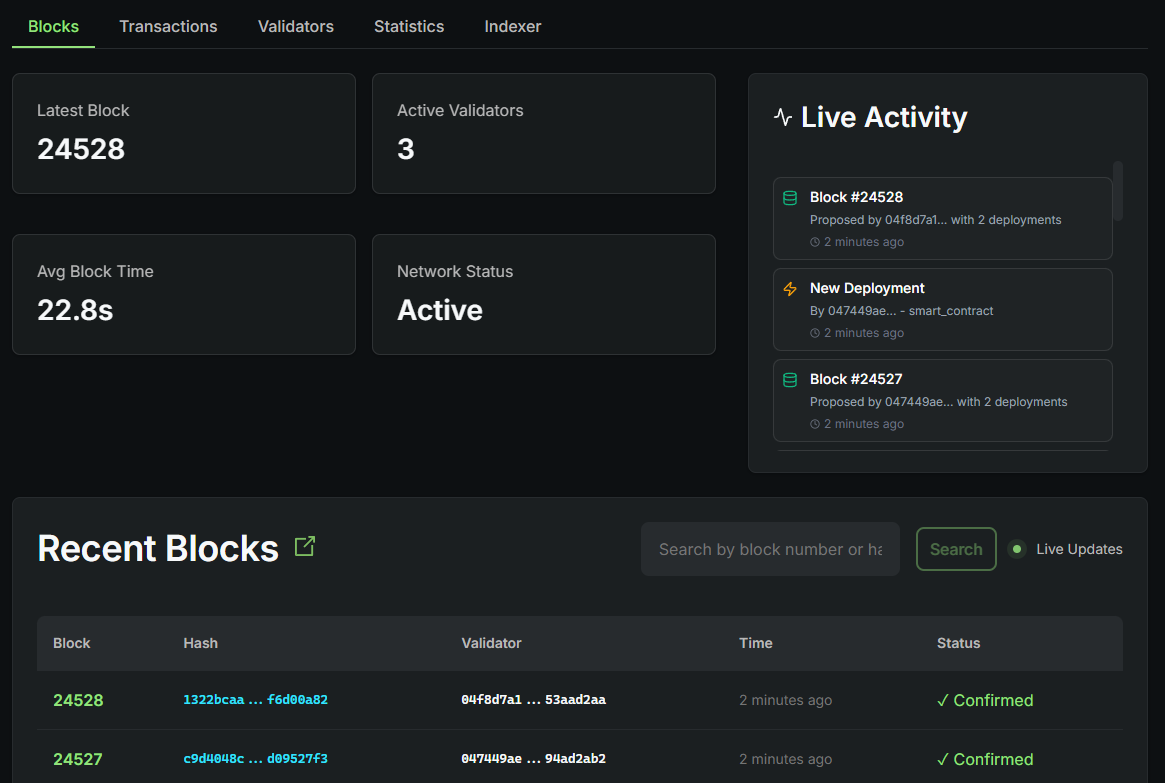
The Blocks page is the main dashboard showing network overview and recent blocks.
Network Summary:
Four key metrics displayed at the top:
- Latest Block: Current block number
- Active Validators: Number of validators currently validating (3)
- Avg Block Time: Average time between blocks (20.0s)
- Network Status: Overall network health
Live Activity Feed:
Real-time feed showing recent network events:
- Block Proposals: Block number, proposing validator, deployments count, time
- Deployments: Deployer address, contract type, time
- Transfers: Transfer amount, sender/recipient addresses, time
Recent Blocks Table:
Displays recent blocks with search and pagination:
- Block number (clickable)
- Block hash (abbreviated)
- Validator public key (abbreviated)
- Time (relative)
- Status (✓ Confirmed)
Transactions Page
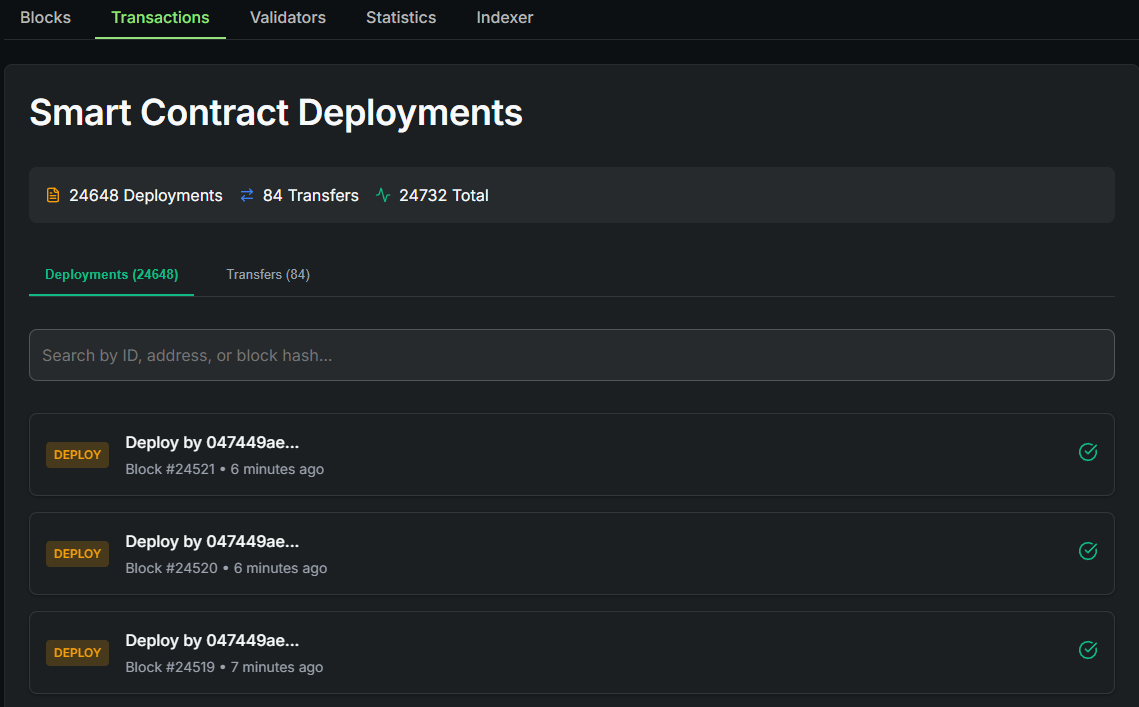
The Transactions page displays all smart contract deployments and token transfers.
Transaction Statistics:
Three summary cards:
- Deployments: Total contract deployments
- Transfers: Total token transfers
- Total: Combined transactions
Transaction Types:
Tab navigation to filter:
- Deployments Tab: Shows all smart contract deployments with deployer address, block number, timestamp, and status
- Transfers Tab: Shows all token transfers with amount, sender/recipient addresses, timestamp, and status
Transaction Cards:
Each transaction displays:
- Type badge (DEPLOY/TRANSFER)
- Summary information
- Block number and time
- Status icon (✓ for confirmed)
Features:
- Search by ID, address, or block hash
- Filter by type
- Pagination controls
Validators Page
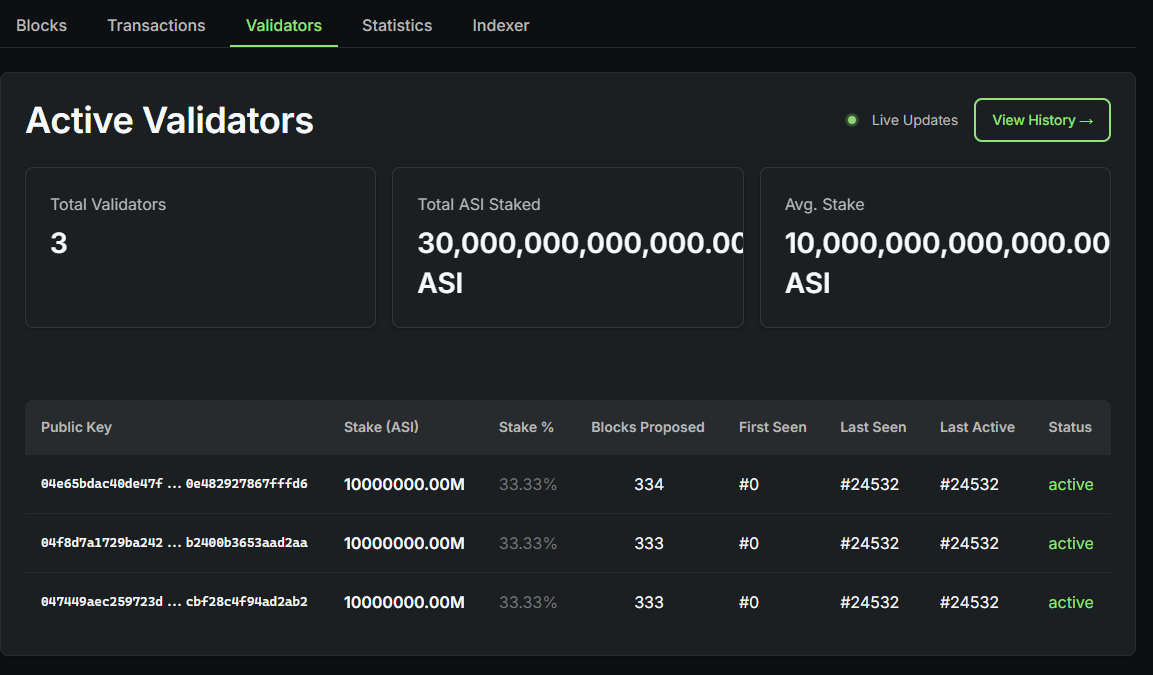
The Validators page shows all active validators and their stake information.
Validator Summary:
Three key metrics:
- Total Validators: Number of active validators (3)
- Total ASI Staked: Combined stake across all validators
- Avg. Stake: Average stake per validator
Active Validators Table:
Displays comprehensive validator information:
- Public Key (abbreviated)
- Stake (ASI) and Stake %
- Blocks Proposed
- First Seen, Last Seen, Last Active (block numbers)
- Status (active/inactive with color coding)
Features:
- Live Updates indicator
- "View History" button for historical validator data
- Color-coded status (green for active)
Validator History
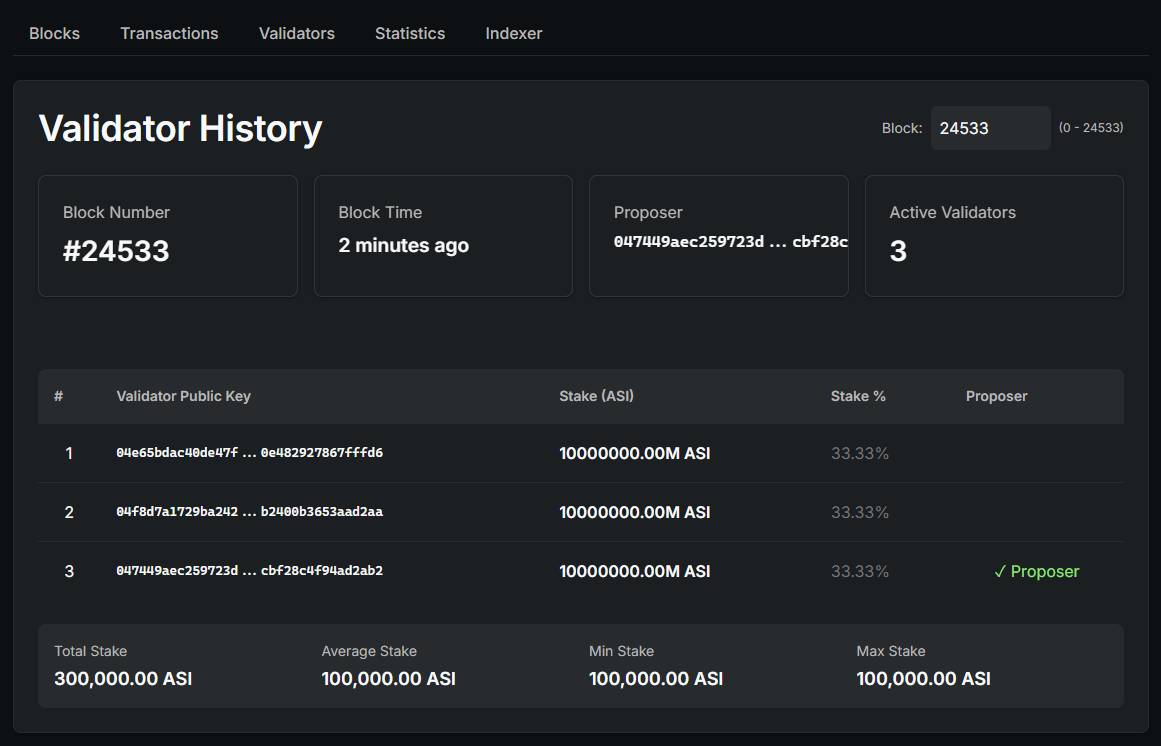
The Validator History page shows validator status at specific block heights.
Block Selection:
Select any block number to view validator state at that point in time.
Validator Details:
For the selected block:
- Block number and time
- Block proposer
- Active validators count
- List of all validators with stake, stake percentage, and proposer indicator
Stake Summary:
Displays total stake, average stake, minimum stake, and maximum stake for the selected block.
Statistics Page
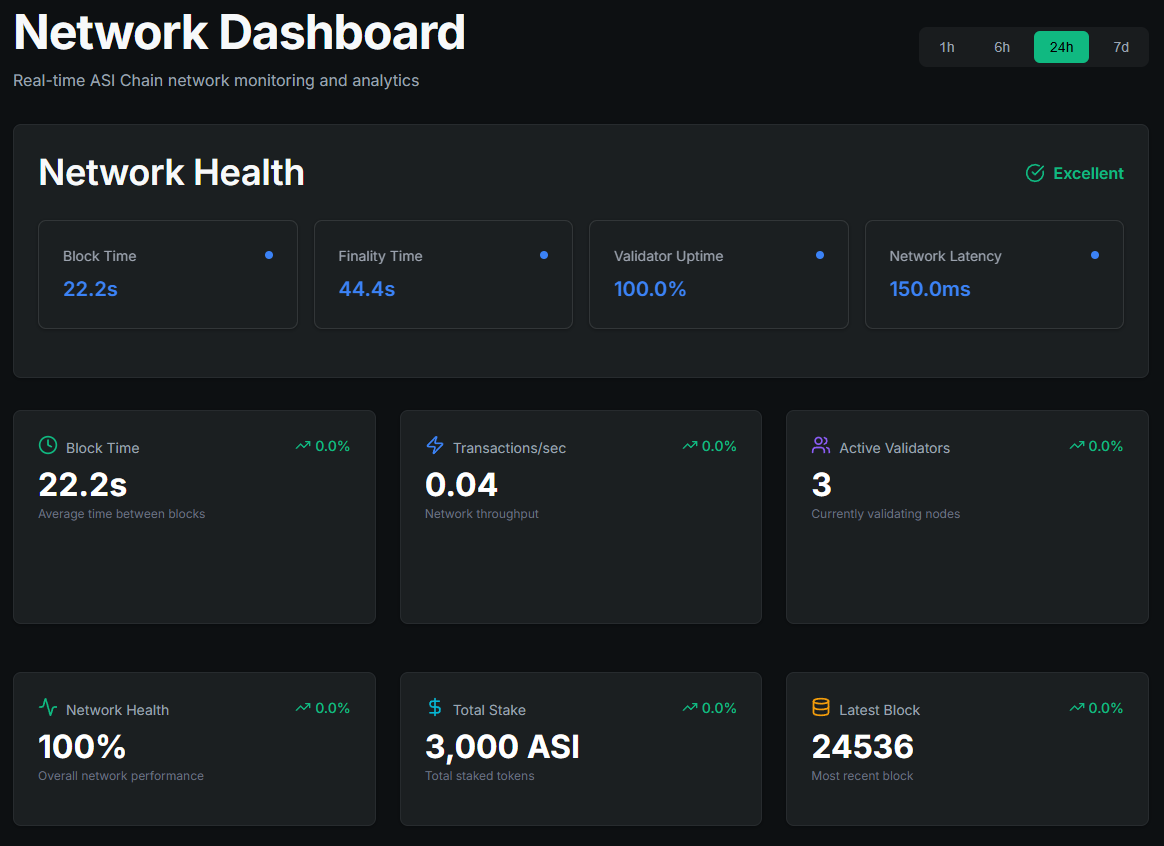
The Statistics page provides network performance metrics and analytics.
Time Range Selector:
Choose data timeframe:
- 1h, 6h, 24h (default), 7d
Network Health Overview:
Overall health status with key metrics:
- Block Time (20.0s)
- Finality Time (40.0s)
- Validator Uptime (100.0%)
- Network Latency (150.0ms)
Network Metrics Cards:
Six detailed metric cards with trend indicators:
- Block Time: Average time between blocks with mini sparkline
- Transactions/sec: Network throughput (TPS)
- Active Validators: Currently validating nodes count
- Network Health: Overall network performance percentage
- Total Stake: Total staked tokens
- Latest Block: Most recent block number
Performance Charts:
Two interactive charts:
- Performance Metrics Chart: Block Time and TPS over time
- Network Activity Chart: Deployments and Transfers over time
Indexer Status Page
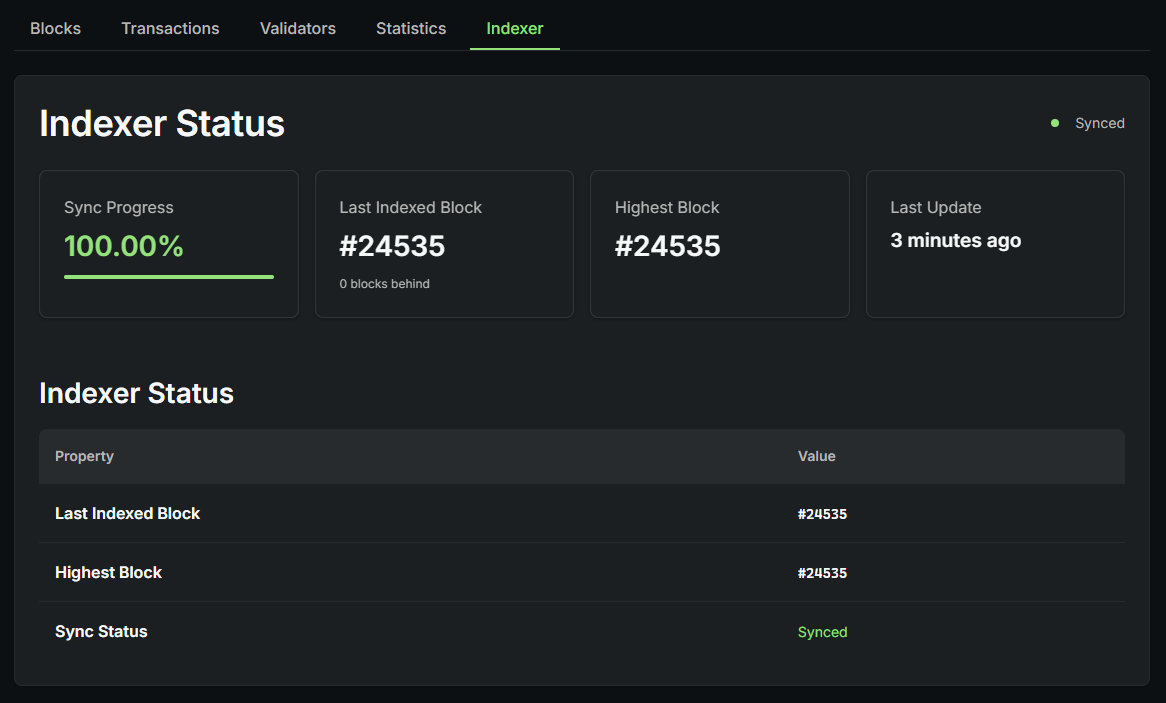
The Indexer Status page displays the synchronization status of the blockchain indexer.
Sync Status:
Shows current synchronization state with color indicator:
- Green: Synced (up to date)
- Yellow: Syncing (catching up)
- Red: Out of sync (behind)
Sync Progress Overview:
Four key metrics:
- Sync Progress: Percentage complete with progress bar
- Last Indexed Block: Block number and blocks behind
- Highest Block: Latest block on network
- Last Update: Time of last sync
Indexer Status Table:
Detailed status information showing last indexed block, highest block, and sync status.
Search Functionality
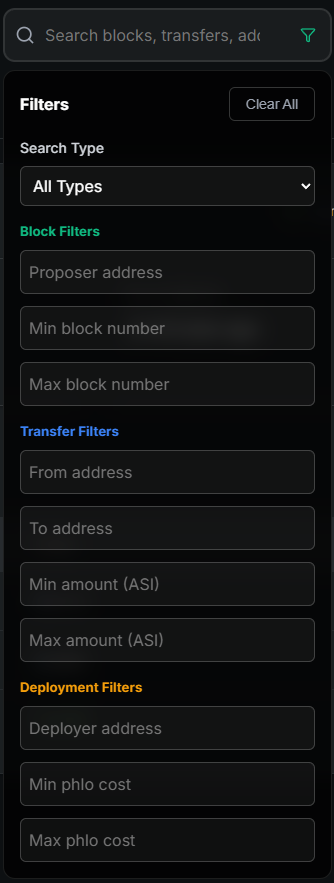
The universal search bar is available in the header on all pages.
Search Types:
- Block numbers
- Block hashes
- Transaction IDs
- Validator addresses
- User addresses
Advanced Filters:
Click the funnel icon to access:
- Filter by transaction type
- Date range selection
- Status filtering
Understanding the Data
Block Information:
- Block Number: Sequential identifier starting from #0
- Block Hash: Unique cryptographic hash
- Validator: Public key of block proposer
- Timestamp: Relative time since block creation
- Status: Confirmed or Pending
Transaction Information:
- Deployment Transactions: Smart contract deployments (DEPLOY badge)
- Transfer Transactions: ASI token transfers (TRANSFER badge)
- Status: ✓ Confirmed (in finalized block) or Pending
Validator Information:
- Public Key: Unique validator identifier (130+ characters)
- Stake: Amount of ASI tokens locked
- Stake Percentage: Validator's portion of total network stake
- Status: Active or Inactive
Support Resources
- Documentation: docs.asichain.io
- Wallet: wallet.dev.asichain.io
- Network Indexer: explorer.dev.asichain.io/indexer-status
- Faucet: faucet.dev.asichain.io
- GitHub: asi-alliance/asi-chain-explorer
Note: The explorer is updated in real-time as new blocks are produced on the ASI Chain network. Data shown is pulled directly from the blockchain and reflects the current state of the network.