

Appearance
Faucet
The ASI Chain Faucet allows you to receive test ASI tokens for development and testing purposes. These tokens have no real value and are exclusively for testing transactions and smart contracts.
Access the faucet: faucet.dev.asichain.io
SECURITY NOTICE
No signature required.
The faucet never asks you to sign any transaction or to enter a seed phrase/private key.
If a signature prompt appears, double-check that you are on the official faucet:
https://faucet.dev.asichain.io
How to Use
Step 1: Enter Your Address
- Navigate to the faucet page
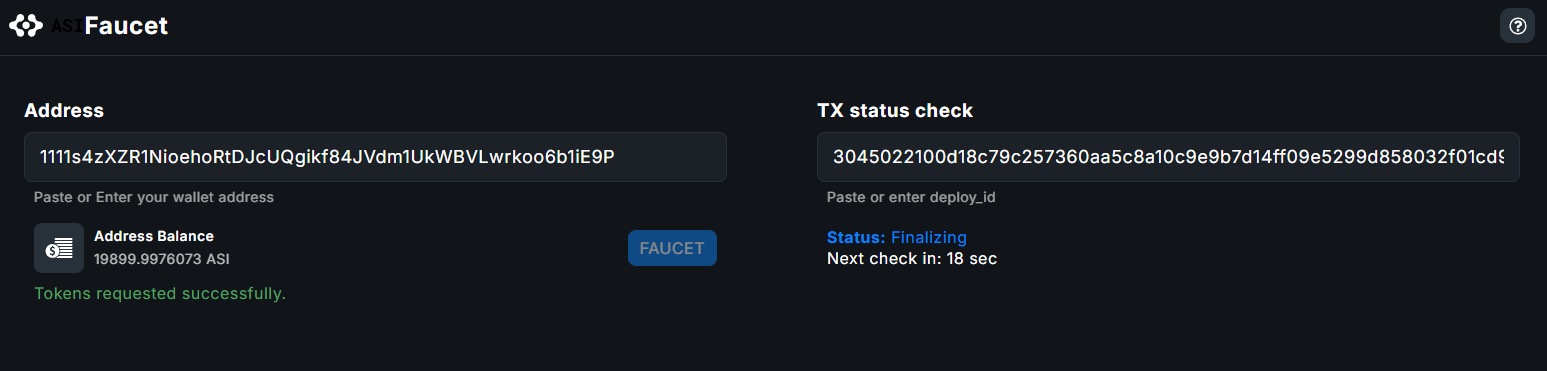
- In the Address field, paste your ASI Chain wallet address
- The address should be a valid network address (50–54 characters and starts with 1111)

Step 2: Request Tokens
- Click the FAUCET button to request test tokens
- The system will check if your address is eligible
- If eligible, tokens will be sent to your address
Address Balance is displayed after requesting tokens to help you verify that tokens have been successfully received.
Step 3: Check Transaction Status
After requesting tokens, you can monitor the transaction status in the TX status check section:
- The transaction ID (deploy_id) is automatically filled in after requesting tokens from the faucet
- The status will display the current stage of your transaction
- "Next check in: [seconds] sec" shows when the transaction status will be automatically updated
Transaction Statuses
Your transaction can have one of the following statuses:
| Status | Description |
|---|---|
| Deploying | Transaction is being processed and broadcasted to the network |
| Finalizing | Transaction is being confirmed by the network |
| Finalized | Transaction successfully completed - tokens are in your wallet |
| Finalization Error | Error occurred during the finalization process |
| Deploy Error | Error occurred while deploying the transaction |
| Unknown | Transaction status cannot be determined |
Troubleshooting
"Address is not eligible":
- You may have already requested tokens recently
- Wait before requesting again
- Check if your address format is correct
Transaction Stuck in "Deploying":
- Network congestion may cause delays
- Wait a few minutes and check the status again
- If the issue persists, try again later
Balance Not Updating:
- Transactions may take a few blocks to confirm
- Refresh the page after a minute
- Check the transaction status using your deploy_id
Support Resources
- Documentation: docs.asichain.io
- Wallet: wallet.dev.asichain.io
- Block Explorer: explorer.dev.asichain.io
- Network Indexer: explorer.dev.asichain.io/indexer-status
- GitHub: asi-alliance/asi-chain-faucet
Note: Test tokens from this faucet have no monetary value and are purely for development and testing purposes on the ASI Chain DevNet.